Deprecated: Return type of SkyVerge\WooCommerce\PluginFramework\v5_5_0\SV_WC_DateTime::getTimestamp() should either be compatible with DateTime::getTimestamp(): int, or the #[\ReturnTypeWillChange] attribute should be used to temporarily suppress the notice in /home/softwaremax/wp.software-max.com/wp-content/plugins/woocommerce-order-status-control/vendor/skyverge/wc-plugin-framework/woocommerce/compatibility/class-sv-wc-datetime.php on line 85

Warning: Cannot modify header information - headers already sent by (output started at /home/softwaremax/wp.software-max.com/wp-content/plugins/woocommerce-order-status-control/vendor/skyverge/wc-plugin-framework/woocommerce/compatibility/class-sv-wc-datetime.php:40) in /home/softwaremax/wp.software-max.com/wp-includes/feed-rss2.php on line 8
Shop - US Global Tech Software Reseller Mon, 14 Oct 2024 17:31:48 +0000 en-US hourly 1 https://wordpress.org/?v=6.6.5 Office Pro Plus 2021 + Windows 10/11 https://wp.software-max.com/product/office-pro-plus-2021-windows-10-11/ https://wp.software-max.com/product/office-pro-plus-2021-windows-10-11/#respond Sun, 23 Jul 2023 22:06:57 +0000 https://wp.software-max.com/?post_type=product&p=212775

How to Activate Your Microsoft Office Product ?

To activate your product key, please follow the steps below. 

Step 1: Please uninstall any previous versions of Office before installing this version. 

Step 2: Go to www.office.com/setup 

Step 3: Sign in with your Microsoft account, or create one if you don’t have one. 

Step 4: Enter your product key provided, without hyphens. 

Step 5: Follow the prompts to finish the installation process. 

Office Professional Plus 2021

Office Professional Plus 2021 delivers features across apps to help users create amazing content in less time.

***THIS PRODUCT REQUIRES WINDOWS 10***

Office for everyone

Microsoft Pro Plus 2021 is designed to help people of all abilities be more productive and inclusive from any device.

Office Pro Plus 2021
_____

Office 2021 Professional Plus includes many of the features previously published via Office 365, along with improved inking features, new animation features in PowerPoint including the morph and zoom features, and new formulae and charts in Excel for data analysis. 

Everything a pro needs, all in one suite — that’s Office 2021 Professional.
_____

Office 2021 Professional is the perfect choice for any professional who needs to handle data and documents. It comes with many new features that will make you more productive in every stage of development, whether it’s processing paperwork or creating presentations from scratch – whatever your needs are!

Office Professional Plus 2021 includes Access, Excel, OneNote, Outlook, PowerPoint, Publisher, Word, and Skype for Business. Access and Publisher aren’t available for devices running macOS.

Available for PC users

Office applications are customized for each platform. The Office applications available for PC users. 

Microsoft Word

Take your writing to the next level with Microsoft Word. Microsoft Word, a word processor is a perfect tool for bloggers, writers, students or journalists working on professional documents. Use custom templates and added features to take your writing that one step further.

Microsoft Excel

Microsoft Excel is a spreadsheet program. Create professional spreadsheets for financial reports using custom-built templates or create your own using modern formulas and calculations.

Microsoft PowerPoint

Create, neat presentations with Microsoft PowerPoint to make you stand out from the rest. Use animations and pre-made templates to improve your presentations. Perfect for students and business owners.

Microsoft Outlook

Outlook is Microsoft's easy to use email service. The desktop application offers more in-depth features than the online outlook service. The perfect tool for all your email needs.

Microsoft Teams

Teams is the primary client for intelligent communications in Microsoft 365 and Office 365, and it'll eventually replace Skype for Business Online. Enhanced features of Teams include: 

Microsoft OneNote

OneNote is best used in a collaborative environment. Insert individual notes, images or other content found on the internet and share with colleagues or family whilst storing it all in one safe, easy to access location.

Microsoft Access

Access is a database management software. If you need to build and create a database or web app to work more efficiently then this is for you. With pre-built templates create web apps that work through the browser or databases with no coding required.

Microsoft Publisher

Microsoft Publisher is one of the applications included in Office 365. This program specializes in creating multiple object publications.Publisher is perfect for businesses that may have a small design team or no dedicated design experts working for them.

]]>
https://wp.software-max.com/product/office-pro-plus-2021-windows-10-11/feed/ 0 212775
Microsoft Windows 10 Professional https://wp.software-max.com/product/microsoft-windows-10-pro/ https://wp.software-max.com/product/microsoft-windows-10-pro/#comments Wed, 10 May 2023 12:50:14 +0000 https://usglobaltech.com/?post_type=product&p=212349

Microsoft Windows 10 Professional, 32/64 bit License

Upgrade to Windows 10 Pro - The Best Operating System Yet

Discover fast and fluid ways to switch between apps, move things around, and go smoothly from one place to another

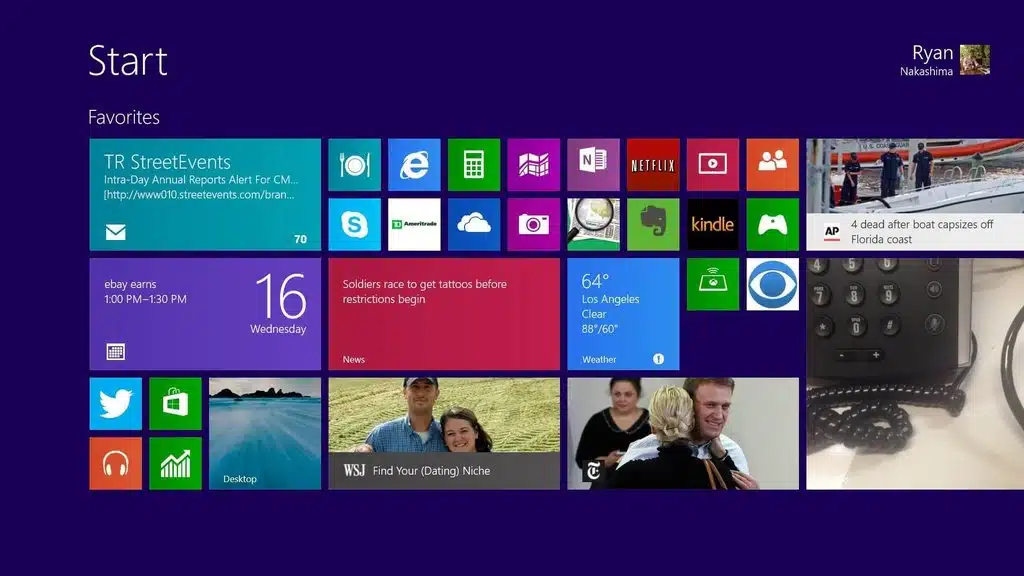
New Start screen​

With the new Windows, you can watch movies or play games, chat with friends, get work done with Office, access files anywhere or find your next favourite app in the Windows Store And you can get to it all, including your familiar desktop, from the new Start screen. From the Start screen, you’re just a click away from the familiar Windows desktop you know, so you can do the same stuff you’ve always done.

Your own unique start screen

Personalize your Start screen with your favourite news, friends, social networks and apps

Your favorite news

Your favorite friends

Your favorite social networks

Your favorite apps

The apps you want

Now you can organize up to three apps on your screen at once in a single view

Thousands of popular apps

In addition to great built-in apps for email, people, photos and video editing, you can also download thousands of popular apps from the Windows Store
]]>
https://wp.software-max.com/product/microsoft-windows-10-pro/feed/ 1 212349
Microsoft Windows 10 Home Edition https://wp.software-max.com/product/microsoft-windows-10-home/ https://wp.software-max.com/product/microsoft-windows-10-home/#respond Wed, 10 May 2023 10:47:15 +0000 https://usglobaltech.com/?post_type=product&p=212336

Microsoft Windows 10 Home License 32/64 Bit

Microsoft Windows 10 Home is a powerful and user-friendly operating system designed for home computer users. With its modern design, improved security features, and intuitive interface, Windows 10 Home provides a seamless experience for everyday tasks such as web browsing, email, and multimedia consumption.

Windows: in sync with the way you live

Windows 10 is an evolution of the Windows 8.1 vision for a world where great devices are paired with a powerful collection of essential apps and cloud-based services.

User-Friendly Interface

The interface of Windows 10 Home is intuitive and user-friendly, making it easy for home users to navigate and find what they need. The Start menu has been updated with live tiles to provide quick access to frequently used applications and information. Additionally, Cortana, Microsoft’s digital personal assistant, makes it easy to search the web, find files, and perform other tasks without leaving the desktop.

Improved Security Features

Windows 10 Home includes features such as Windows Hello, which provides biometric authentication, and Windows Defender, which provides real-time protection against malware. These features help ensure the security and privacy of your data, giving you peace of mind while using your home computer.

Apps and Multimedia Content

By using Microsoft Windows 10 Home, home users can enjoy a user-friendly interface, improved security features, and a wide range of apps and multimedia content. These advantages make Windows 10 Home the perfect operating system for anyone looking for a powerful and easy-to-use platform for their daily tasks.

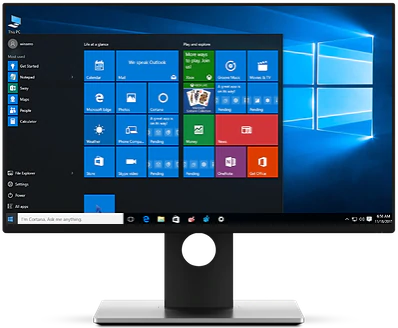
Start menu

The familiar Start menu has been updated with live tiles to provide quick access to frequently used applications and information.

Cortana

Microsoft’s digital personal assistant makes it easy to search the web, find files, and perform other tasks without leaving the desktop.

Edge browser

Edge is a fast and secure web browser that offers improved performance, reading mode, and Cortana integration.

Improved security

Windows 10 Home includes features such as Windows Hello, which provides biometric authentication, and Windows Defender, which provides real-time protection against malware.

Microsoft Store

The Microsoft Store provides access to a wide range of apps, games, and multimedia content, making it easy to find what you’re looking for.

Xbox integration

Windows 10 Home also offers seamless integration with Xbox, allowing you to stream games from your Xbox console to your PC.
]]>
https://wp.software-max.com/product/microsoft-windows-10-home/feed/ 0 212336
Microsoft Windows 11 Professional https://wp.software-max.com/product/microsoft-windows-11-pro/ https://wp.software-max.com/product/microsoft-windows-11-pro/#respond Wed, 10 May 2023 10:26:56 +0000 https://usglobaltech.com/?post_type=product&p=212333

The greatest thing about Windows 11 Home is that it feels natural. Plus, it works seamlessly across all your devices.

Expanded Start menu

The familiar Start menu is back, providing quick, one-click access to the functions and files that people use most, and also a new space to personalize with favorite apps, programs, people, and websites.

Apps that run in Windows

Apps from the Windows Store now open in the same format that desktop programs do. They can be resized and moved around, and they have title bars at the top, allowing users to maximize, minimize, and close with a click

Snap enhancements

Have up to four apps snapped on the same screen with a new quadrant layout. Windows will also show other apps and programs running for additional snapping, and even make smart suggestions about filling available screen space with other open apps.

Better Security

Built-in virus protection

With built-in virus protection, Windows Defender protects your device from sophisticated threats with a combination of processes to help identify and block ransomware. Automatic updates ensure you have complete, ongoing protection against current and future threats.

Sign in: 3 times faster

Sign in to your Windows devices in less than 2 seconds with Windows Hello — 3 times faster than a password. Facial or fingerprint recognition provides instant access, and you always have the option of retaining a PIN as a backup.

]]>
https://wp.software-max.com/product/microsoft-windows-11-pro/feed/ 0 212333
Microsoft Windows 11 Home https://wp.software-max.com/product/microsoft-windows-11-home/ https://wp.software-max.com/product/microsoft-windows-11-home/#respond Wed, 10 May 2023 09:39:25 +0000 https://usglobaltech.com/?post_type=product&p=212301

The greatest thing about Windows 11 Home is that it feels natural. Plus, it works seamlessly across all your devices.

Expanded Start menu

The familiar Start menu is back, providing quick, one-click access to the functions and files that people use most, and also a new space to personalize with favorite apps, programs, people, and websites.

Apps that run in Windows

Apps from the Windows Store now open in the same format that desktop programs do. They can be resized and moved around, and they have title bars at the top, allowing users to maximize, minimize, and close with a click

Snap enhancements

Have up to four apps snapped on the same screen with a new quadrant layout. Windows will also show other apps and programs running for additional snapping, and even make smart suggestions about filling available screen space with other open apps.

Better Security

Built-in virus protection

With built-in virus protection, Windows Defender protects your device from sophisticated threats with a combination of processes to help identify and block ransomware. Automatic updates ensure you have complete, ongoing protection against current and future threats.

Sign in: 3 times faster

Sign in to your Windows devices in less than 2 seconds with Windows Hello — 3 times faster than a password. Facial or fingerprint recognition provides instant access, and you always have the option of retaining a PIN as a backup.

]]>
https://wp.software-max.com/product/microsoft-windows-11-home/feed/ 0 212301
Microsoft Office Professional Plus 2019 https://wp.software-max.com/product/office-professional-pro-plus-2019/ https://wp.software-max.com/product/office-professional-pro-plus-2019/#respond Tue, 06 Sep 2022 02:21:41 +0000 https://usglobaltech.com/?post_type=product&p=212084
Microsoft Office Professional Plus 2019 Digital License Key Lifetime 32/64 (For Windows Only)
]]>

Office Professional Plus 2019

Office Professional Plus 2019 delivers features across apps to help users create amazing content in less time.

***THIS PRODUCT REQUIRES WINDOWS 10***

Office for everyone

Microsoft Pro Plus 2019 is designed to help people of all abilities be more productive and inclusive from any device.

Office Pro Plus 2019
_____

Office 2019 Professional Plus includes many of the features previously published via Office 365, along with improved inking features, new animation features in PowerPoint including the morph and zoom features, and new formulae and charts in Excel for data analysis. 

Everything a pro needs, all in one suite — that’s Office 2019 Professional.
_____

Use Microsoft Office Professional Plus 2019 for Windows, a productivity suite of software for editing documents, creating spreadsheets, making computer slide shows, reading email and more.

Office Professional Plus 2019 includes Access, Excel, OneNote, Outlook, PowerPoint, Publisher, Word, and Skype for Business. Access and Publisher aren’t available for devices running macOS.

Available for PC users

Office applications are customized for each platform. The Office applications available for PC users. 

Microsoft Word

Take your writing to the next level with Microsoft Word. Microsoft Word, a word processor is a perfect tool for bloggers, writers, students or journalists working on professional documents. Use custom templates and added features to take your writing that one step further.

Microsoft Excel

Microsoft Excel is a spreadsheet program. Create professional spreadsheets for financial reports using custom-built templates or create your own using modern formulas and calculations.

Microsoft PowerPoint

Microsoft PowerPoint presentations are the mainstay of most business presentations. With PowerPoint, users can create more impactful and fluid presentations with enhanced features such as:

Microsoft Publisher

Microsoft Publisher, whilst similar to Word is a basic level publishing tool designed to create books, flyers or a variety of promotional documents.

Microsoft Access

Microsoft Access is an advanced database management system used to store, order and structure information for reporting and analysis. Microsoft Access analyzes large amounts of data faster than with programs such as Excel. Microsoft has improved the Access experience and offers a number of enhanced features, including:

Microsoft Outlook

Outlook is Microsoft's easy to use email service. The desktop application offers more in-depth features than the online outlook service. The perfect tool for all your email needs.

Microsoft OneNote

OneNote is best used in a collaborative environment. Insert individual notes, images or other content found on the internet and share with colleagues or family whilst storing it all in one safe, easy to access location.

  Bind Key is linked to your Microsoft account and supports unlimited reinstallation. To activate: https://setup.office.com 

Electronic delivery: When you purchase this software from Softwaredeals, you will be able to install this operating system on your machine quickly as the software will arrive to you via electronic delivery.

]]>
https://wp.software-max.com/product/office-professional-pro-plus-2019/feed/ 0 212084
Microsoft Office Home and Business 2021 for Mac https://wp.software-max.com/product/office-home-and-business-2021-for-mac/ https://wp.software-max.com/product/office-home-and-business-2021-for-mac/#respond Tue, 06 Sep 2022 02:18:09 +0000 https://usglobaltech.com/?post_type=product&p=212081 (For MAC only)]]>

How to Activate Your Microsoft Office Product ?

To activate your product key, please follow the steps below. 

Step 1: Please uninstall any previous versions of Office before installing this version. 

Step 2: Go to www.office.com/setup 

Step 3: Sign in with your Microsoft account, or create one if you don’t have one. 

Step 4: Enter your product key provided, without hyphens. 

Step 5: Follow the prompts to finish the installation process. 

Office Home and Business for Mac 2021

Office 2021 delivers features across apps to help users create amazing content in less time.


Office for everyone

In Office 2021, you’ll find new inking tools, data types, functions, translation and editing tools, motion graphics, ease-of-use features, and so much more! Check out what’s available to you today.

Get geared up with Office Home and Business 2021!
_____

Get hold of Microsoft Office 2021 and you’ve got the most powerful office applications at your fingertips: Word, Excel and PowerPoint offer a level of depth and control that you don’t get from the likes of Google Docs or open source office alternatives.

Office 2021 –
continuous innovation
_____

Microsoft Office 2021 is a suite of applications designed to help with productivity and completing common tasks on a computer. You can create and edit documents containing text and images, work with data in spreadsheets and databases, and create presentations and posters.

Office 2021 is always-up-to-date version of the Office apps.

Available for PC and Mac users

Office applications are customized for each platform. The Office applications available for Mac users and the specific features that are included may differ from those available for PC users.

Microsoft Word 2021

Microsoft Word is considered the best word processor available on the market today. Word 2021 allows its users to easily create compelling content with a number of new features, including:

Microsoft Excel 2021

Microsoft Excel has been the most famous spreadsheet software for many years. It provides all the necessary tools to create graphs and perform complex calculations. Office 2021’s Excel has upgraded the spreadsheet experience and added new data analysis features, including:

Microsoft PowerPoint 2021

Microsoft PowerPoint presentations are the mainstay of most business presentations. With PowerPoint 2021, users can create more impactful and fluid presentations with enhanced features such as:

Microsoft Outlook 2021

Manage email more efficiently. Focus Mode blocks out distractions and puts your content front and center. And Focused Inbox moves less important emails out of the way—so you can get straight to taking care of business.

Microsoft OneNote 2021

OneNote is a digital note-taking app that provides a single place for keeping all of your notes, research, plans, and information — everything you need to remember and manage in your life at home, at work, or at school.

Electronic delivery: When you purchase this software from Softwaredeals, you will be able to install this operating system on your machine quickly as the software will arrive to you via electronic delivery.

]]>
https://wp.software-max.com/product/office-home-and-business-2021-for-mac/feed/ 0 212081
Microsoft Office Professional Plus 2021 https://wp.software-max.com/product/office-professional-2021-pro-plus/ https://wp.software-max.com/product/office-professional-2021-pro-plus/#respond Tue, 06 Sep 2022 01:56:21 +0000 https://usglobaltech.com/?post_type=product&p=212072 (For Windows Only)]]>

How to Activate Your Microsoft Office Product ?

To activate your product key, please follow the steps below. 

Step 1: Please uninstall any previous versions of Office before installing this version. 

Step 2: Go to www.office.com/setup 

Step 3: Sign in with your Microsoft account, or create one if you don’t have one. 

Step 4: Enter your product key provided, without hyphens. 

Step 5: Follow the prompts to finish the installation process. 

Office Professional Plus 2021

Office Professional Plus 2021 delivers features across apps to help users create amazing content in less time.

***THIS PRODUCT REQUIRES WINDOWS 10***

Office for everyone

Microsoft Pro Plus 2021 is designed to help people of all abilities be more productive and inclusive from any device.

Office Pro Plus 2021
_____

Office 2021 Professional Plus includes many of the features previously published via Office 365, along with improved inking features, new animation features in PowerPoint including the morph and zoom features, and new formulae and charts in Excel for data analysis. 

Everything a pro needs, all in one suite — that’s Office 2021 Professional.
_____

Office 2021 Professional is the perfect choice for any professional who needs to handle data and documents. It comes with many new features that will make you more productive in every stage of development, whether it’s processing paperwork or creating presentations from scratch – whatever your needs are!
Office Professional Plus 2021 includes Access, Excel, OneNote, Outlook, PowerPoint, Publisher, Word, and Skype for Business. Access and Publisher aren’t available for devices running macOS.

Available for PC users

Office applications are customized for each platform. The Office applications available for PC users. 

Microsoft Word

Take your writing to the next level with Microsoft Word. Microsoft Word, a word processor is a perfect tool for bloggers, writers, students or journalists working on professional documents. Use custom templates and added features to take your writing that one step further.

Microsoft Excel

Microsoft Excel is a spreadsheet program. Create professional spreadsheets for financial reports using custom-built templates or create your own using modern formulas and calculations.

Microsoft PowerPoint

Create, neat presentations with Microsoft PowerPoint to make you stand out from the rest. Use animations and pre-made templates to improve your presentations. Perfect for students and business owners.

Microsoft Outlook

Outlook is Microsoft's easy to use email service. The desktop application offers more in-depth features than the online outlook service. The perfect tool for all your email needs.

Microsoft Teams

Teams is the primary client for intelligent communications in Microsoft 365 and Office 365, and it'll eventually replace Skype for Business Online. Enhanced features of Teams include: 

Microsoft OneNote

OneNote is best used in a collaborative environment. Insert individual notes, images or other content found on the internet and share with colleagues or family whilst storing it all in one safe, easy to access location.

Microsoft Access

Access is a database management software. If you need to build and create a database or web app to work more efficiently then this is for you. With pre-built templates create web apps that work through the browser or databases with no coding required.

Microsoft Publisher

Microsoft Publisher is one of the applications included in Office 365. This program specializes in creating multiple object publications.Publisher is perfect for businesses that may have a small design team or no dedicated design experts working for them.

]]>
https://wp.software-max.com/product/office-professional-2021-pro-plus/feed/ 0 212072
Office 365 Personal – 1 User / 12 Months https://wp.software-max.com/product/office-365-personal-1-user-12-months/ https://wp.software-max.com/product/office-365-personal-1-user-12-months/#respond Mon, 27 Jun 2022 16:09:25 +0000 https://usglobaltech.com/?post_type=product&p=193496
  • 12-month subscription for one person
  • 1TB OneDrive cloud storage
  • ]]>
    Create your best work. With Office 365 Personal, you get Word, Excel, PowerPoint, Outlook, and more. Work anywhere with apps that are always updated. Available in an annual or monthly subscription. Your subscription will continue until cancelled.

    ]]>
    https://wp.software-max.com/product/office-365-personal-1-user-12-months/feed/ 0 193496
    Men’s Showtheway Shoes https://wp.software-max.com/product/mens-showtheway-shoes/ https://wp.software-max.com/product/mens-showtheway-shoes/#comments Thu, 07 Jun 2018 11:34:14 +0000 http://demo.woothemes.com/woocommerce/?post_type=product&p=87 Lorem ipsum dolor sit amet, consectetur adipiscing elit, sed do eiusmod tempor incididunt ut labore et dolore magna aliqua. Ut enim ad minim veniam, nostrud ipsum consectetur sed do, quis nostrud exercitation ullamco laboris nisi ut aliquip ex ea commodo consequat. Duis aute irure dolor in reprehenderit in voluptate velit esse cillum dolore eu fugiat nulla pariatur. Excepteur sint occaecat.
    • Any Product types that You want – Simple, Configurable
    • Downloadable/Digital Products, Virtual Products
    • Inventory Management with Backordered items

    Sed do eiusmod tempor incididunt ut labore et dolore magna aliqua. Ut enim ad minim veniam, quis nostrud exercitation ullamco laboris nisi ut aliquip ex ea commodo consequat.

    ]]>
    https://wp.software-max.com/product/mens-showtheway-shoes/feed/ 1 602